Writers in the Storm

A blog about writing

storm moving across a field
Nine Keys to Being Media Ready

by Lisa Norman

A marketing guru was talking to authors and advised them to be “media ready” before hiring a marketing assistant. I watched most of the authors in the virtual room look confused.

I work with authors, and many of them are not "media ready." You can tell those that are: their sales are higher.

What does it mean to be media ready?

Being media ready means that you will present yourself as a professional if you get the chance to be on a podcast, blog interview, or television show.

I watched an author botch an appearance on "The View." When the hosts started asking her questions, she stopped them and asked them to introduce themselves. She had a ten-minute segment and she wasted valuable moments because she didn't know who Whoopi Goldberg was.

Another author I met had an opportunity for a piece of great promo. She hadn't made sure her website was on a stable platform. A few minutes into a national interview, her server crashed because it couldn't handle the traffic.

What can an author do to become media ready?

1. Start with a website.

You want to prove you are professional. In the following points, I’ll give you ideas of things to include, but at the very least, make sure your site is on a solid hosting platform, has SSL (encryption–ask your hosting company), and a pleasing theme. Doesn’t need to be fancy.

2. Have a media kit or an “about” page on your website.

3. Have a good bio.

Media professionals (bloggers, interviewers, and publicity folks) will use your bio to promote and introduce you. If you are asked to do a speaking engagement, they may read part of it before you speak. Make sure your bio is current and well written–make sure it sounds good when read aloud.

4. Have a current headshot.

You want to look approachable and professional. Note that this does not mean stiff and formal! Consider what will appeal to your audience.

5. License the headshot so that media pros can use it.

Every photo has an implied copyright and can not be used without permission. Those permissions are also called a “license.” If you or your friend take the picture and you agree that it belongs to you and that you are free to distribute it widely, then you own the license to that photo. You can give permission to media professionals to use it.

If you have the photo taken by a professional photographer, the photographer owns the rights to that photo. They may give you the rights to use it. This comes in the form of a letter that you keep. Some photographers request that you add a link to their website or list their name on every photo, for example.

Make sure that you know the license for the photo and that you share the information clearly. This shows that you are a professional. If you put the photo on your media kit, most media professionals will assume that it is licensed for their use. If you include credits on the photo, they should also include them, but if your photographic use license specifies credits are required, make that note wherever you share the image.

6. Have a social media presence.

Put visible links to your social media platforms on your website and in your media kit. On your social media platforms, have genuine interactions with people. Don’t let your social media be all about sales. Media professionals want to see that you are an interesting person, not a multi-level marketing tiger. Promotion isn’t all about selling books. There is more to marketing than sales. By interacting like a human being instead of a marketer on social media, you prove you understand this. Let whoever is searching out your presence see that you connect with humans well.

7. Learn how publicity and marketing work.

For example, don’t expect that this media engagement will only sell books. Be aware that sometimes you are increasing your exposure, getting your name into people’s minds, gathering social media followers, etc.

8. Know what a conversion looks like.

A conversion is a fancy term for when a marketing campaign succeeds. Success is what you define as your goal. Sometimes this means a person buys your book. It can also mean that they sign up for your newsletter or in other ways become a staunch fan.

Pop Quiz:

Would you rather have someone:

a) buy your book or

b) ask their librarian to buy your book?

(Answer is b - because libraries buy several copies at a time, and if the librarian likes your book, they’ll recommend it to people. Librarians sell a lot of books.)

9. Know how to speak in public.

This may mean taking a public speaking class or just pushing yourself outside of your comfort zone. Make eye contact (yes, even on Zoom) and engage with people. Work on banning “um” from your vocabulary. Show up looking and sounding like the professional that you are.

If you’ve done these 9 things, you will be more attractive to media outlets, bloggers, podcasters, and speaking gigs.

What are some other ideas you have for becoming media ready? Please share them with us down in the comments!

About Lisa

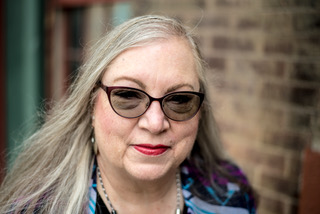
head shot of smiling Lisa Norman

Lisa Norman's passion has been writing since she could hold a pencil. While that is a cliché, she is unique in that her first novel was written on gum wrappers. As a young woman, she learned to program and discovered she has a talent for helping people and computers learn to work together and play nice. When she's not playing with her daughter, writing, or designing for the web, she can be found wandering the local beaches.

Lisa writes as Deleyna Marr and is the owner of Deleyna's Dynamic Designs, a web development company focused on helping writers, and Heart Ally Books, an indie publishing firm. She teaches for Lawson Writer's Academy.

Interested in learning more from Lisa? See her teaching schedule below.

Classes:

Image Credits:

Read More
To Comma, or Not to Comma (Part 2)

by Lori Freeland

Welcome to comma central, where we’re talking about all things comma. Among most writers, you’ll find a consensus when it comes to this tiny, ambiguous mark. They don’t like it. It’s too confusing. When do you use it? Where do you use it? Why do you use it? And who even cares, really?

Trust me, as a writer, you do!

So let’s get back to answering the question, to comma, or not to comma? If you missed Part 1, check it out here. To Comma, or Not to Comma. In this section, we’ll cover essential and nonessential information in a sentence and how that plays into when and where you add in commas or leave them out.     

But first, a quick review.

Crucial Definitions

A CLAUSE is a group of words with a subject and predicate that make up part of a complex or compound sentence.

Or think of it this way. A CLAUSE has both a noun and a verb and is part of a longer sentence.

A SUBJECT is a noun (person, place, thing) doing the action.

A PREDICATE is a verb that tells you what action that noun is doing.

An OBJECT is a noun (person, place, thing) receiving the action. Not all sentences have objects, and that’s okay.

Here’s an example.

Mr. Jones (noun) walked (verb) his yippy dog (object) at the crack of dawn.

Nonessential vs Essential Information

When it comes to your sentence, what information can you afford to lose and what information do you have to keep? How do you figure it out? And what do you do once you know?

The quick answer is:

  • nonessential information is the part of a sentence you can do without. 
  • essential information is the part of a sentence you can’t do without. 

Nonessential Information:

Let’s start with nonessential information—the parts of a sentence you can do without. That doesn’t mean we’re putting those words on the chopping block. It just means we need to set them off with commas.

What we put inside commas or after a comma is usually considered NONESSENTIAL information. It isn’t needed to decipher the meaning of the sentence.

In the examples below, the bolded words are nonessential.

Inside Commas: The book on the shelf, which is exciting, is the one you should read next.

After a Comma: The weather in Texas is hot, which I really don’t like.

Do you see how the bolded information doesn’t really matter when it comes to understanding the sentence? The important part the author is trying to get across is that it’s hot in Texas.

The key point to note here is this. If we were to take out anything between the commas or after the comma, the sentence still has to be grammatically correct and make sense. It has to do both.

Nonessential words are red shirts. Like in the original Star Trek. Treat what’s in between commas of after a comma as a red shirt—an expendable part of the team, usually the first to die. At any time, I could sacrifice it without losing a crucial member of the sentence squad.

Inside Commas: A week off for vacation, I think, is great.

After a Comma: A week off for vacation is great, I think.

Removing “I think” in either instance above changes nothing grammatically or in terms of what each sentence means.

The red-shirt idea works for clauses, phrases, and single words too. Any of the words in bold below can be deleted and still keep the sentence grammatically correct without changing the essence of what I want the sentence to mean.

  • Clause: Next October, which is my favorite month, works for our writing retreat.
  • Phrase: You’re a great guy. Your brother, sad to say, I could do without.
  • Word: I usually like my English teacher. Today, however, I do not.

Is It Needed or Not Needed?

Purdue Owl has put together a list of questions to help you figure out whether information is needed or not needed for sentence clarity. 

  1. If you leave out the clause, phrase, or word, does the sentence still make sense?
  2. Does the clause, phrase, or word interrupt the flow of words in the original sentence?
  3. If you move the element to a different position in the sentence, does the sentence still make sense?

If you answer “yes” to any of the above, the clause, phrase, or word is nonessential and should be set off with commas.

Now that we’ve said all of this and you have a better idea of what the nonessential parts of a sentence are, what do you do with your new knowledge?

  • Look for places to add commas.
  • Look for places to remove commas.

That’s all.

IMPORTANT: This DOES NOT mean you should delete everything you deem nonessential. It DOES mean you should put commas around everything you deem nonessential.

However, if you’re looking for ways to tighten your WIP and really don’t need that information, deleting unneeded words and phrases here and there is a great place to start.

But please consider things like sentence flow, mood, and character voice before you start dismembering your manuscript.  

As we jump into essential information, keep in mind that the comma is our “clue” as readers and writers to identify what we don’t need.

But watch out for the EXCEPTION.

If there’s a coordinating conjunction (and, but, for, or, nor, so, yet), it tells us we need the information that follows the comma(s). Below, what comes after the word in bold is considered essential information. You need it. We’ll dive into this a little later.

Coordinating Conjunction: The weather in Texas is hot, and I refuse to move there.

Essential Information:

image of colorful commas illustrating a post by Lori Freeland called to comma, or to not to comma

Now that we know what nonessential information is and how to handle it, what do we do with essential information? We don’t put it between or after commas.

Correct: We can order take out if you pay.

Incorrect: We can order take out, if you pay.

Why? “We can order take out” makes sense. Yet if we stop there, we’re missing vital information that changes our understanding of the sentence.

“If you pay” is essential to the meaning. Think of it this way. I’m broke. And we can’t order out if you’re not paying. Or I’m cheap, and I won’t spend my money. Or maybe I just don’t like you, and I’m saving my money for something better than bringing you dinner.

Correct: The dress you loaned me was too tight.

Incorrect: The dress, you loaned me, was too tight.

Correct: The puppy inside the dog pen is my first choice.

Incorrect: The puppy, inside the dog pen, is my first choice.

If you made any of the words in bold above fair game to delete—by putting them between commas or after a comma—we won’t know which dress or which puppy you’re talking about. We need those descriptive phrases. 

Here are a few more.

Correct: People who steal usually get caught.

Incorrect: People, who steal, usually get caught.

Correct: The boy standing over there is cute.

Incorrect: The boy, standing over there, is cute.

Again, without the words in bold, we won’t know which “people” or which “boy.” 

“That” Clauses after a Noun

Do not put commas around or before clauses that start with “that” and follow a noun. Any words after “that,” we need. Check out the words in bold.   

Correct: The painting that you made me always makes me smile.

Incorrect: The painting, that you made me, always makes me smile.

Why? It’s a specific painting that makes me cry.  

“That” Clauses after a Verb that Expresses Mental Action

Correct: My daughter hopes that she will be able to find a new job.

Incorrect: My daughter hopes, that she will be able to find a new job.

Why? If you take the bold part out, it leaves a generic “My daughter hopes.” Hopes for what?

Commas with Names

Is a person’s name essential or nonessential in a sentence like this?

My sister, Rachel, is pretty but mean.

It depends. How many sisters do you have? If you only have one sister, her name is nonessential, and we can keep it inside the commas. We know exactly who you’re referring to.

If you have eight sisters—or just more than one—her name is essential. We want to remove the commas. It would be unfair to slander a perfectly nice sister.   

My sister Rachel is pretty but mean.

Whew! We’re done. You made it through the comma maze. We’ve dissected a lot of information in Part 2 of this series. If you feel like you’re in a comma coma, no worries. Go back and grab a chunk of each section to gnaw on for a while. And practice writing your own examples. Use mine and change up the words. Most of us remember things best when we get handsy with them. 

Stay tuned for the third part of this series. We’ll talk about using commas with multiple adjectives—when do you, when don’t you?—and that dratted Oxford comma too.     

In the meantime, here are some of my favorite grammar sites.

  • My favorite go-to for commas is Purdue Owl, where they break down the basic comma rules into a quick guide as well as an extended guide. You can check them out here. Quick Comma Rules and Extended Comma Rules.

You can also find great information at:

Let’s discuss in the comments. Do you have a hard time figuring out what’s nonessential and essential in your sentences? What clues do you use to add or remove commas? Please share your favorite grammar references and your comma tips and tricks below!

About Lori

An encourager at heart, author, editor, and writing coach Lori Freeland believes everyone has a story to tell. She’s presented multiple workshops at writer’s conferences across the country and writes everything from non-fiction to short stories to novels—YA to adult. When she’s not curled up with her husband drinking too much coffee and worrying about her kids, she loves to mess with the lives of the imaginary people living in her head.

You can find her young adult and contemporary romance at lorifreeland.com and her inspirational blog and writing tips at lafreeland.com. Her book, Where You Belong: a runaway series novella, is currently free on Kindle Unlimited. 


Where You Belong

A girl can run from her roots, but she can’t escape her heart.  

Six years ago, after a practical joke gone wrong, Hendrix Marshall blew the single stoplight in the town of Runaway, Wisconsin, and never looked back. But when Grandpa Joe—retired hippie, Jimmy Hendrix devotee, and the man who raised her—ends up in the hospital, she reluctantly agrees to take a cab home. As long as she can keep the meter running. But then she comes heel-to-boot with Alexander Ryland—former best friend, sometimes nemesis, always secret crush. And his ocean-blue eyes still have the power to launch cartwheels in her belly. Too bad his freestyle attitude makes her certifiable. He’s the reason she left. He won’t be the reason she stays. Even if he’s determined to collect interest on the kiss she’s owed him for the last ten years.

Read More
35 Tips to a Healthier Writer You in 2022

by Lynette M. Burrows

It’s the holidays and your non-writing mind may be on giving gifts to others. That’s wonderful, but consider giving a writer-centric gift to yourself. Writers are often workaholics, to their physical detriment. This holiday season, give yourself the gift of better health. Here are 35 tips to make you a healthier writer in 2022.

Please note that this is not medical advice. If you have symptoms of repetitive stress injuries or any chronic medical issues, consult your personal health care provider before changing your work environment or habits.

For Your Eyes

Focusing on the computer screen makes the user blink thirty to fifty percent less frequently than normal. This causes dry, red, gritty-feeling eyes, and eyestrain.

The American Academy of Ophthalmology has a lot to say about how to avoid eye strain. The essentials are:

  • Keep the computer 25 inches (an arm’s length) away from your face.
  • The top of the monitor should be at eye level.
  • Reduce glare by repositioning lights or using an anti-glare filter.
  • Give your eyes a 20-20-20 break. Every twenty minutes, look twenty feet away for twenty seconds.
  • Use a desktop humidifier or artificial tears.
  • Natural lighting is best. A combination of natural and artificial light will also work.
  • Adjust the brightness of your room (or screen) so your screen is less bright than the room lights.
photograph ofa woman

For Your Hands and Arms

  • Find a keyboard that allows your wrists to be in a neutral position (not flexed). 
  • Your mouse should be in easy reach of your dominant hand. Or you can use a foot controlled mouse.
  • Try to keep your arms parallel to the floor.
  • Avoid resting your arms on the edge of the keyboard, desk, or table.
  • Elbows should be at 100 to 110 degrees. This means your keyboard should be slightly higher in the back of it, so use those little feet on your keyboards. 

For Your Heart and Circulation

  • When you take a break, do something. Walk a hundred paces, do stretches, get up and move.
  • Do aerobic exercises every day, at least every day you’re at the computer.
  • Blood is about fifty percent water. Drink eight glasses of water a day to keep it moving. 

For Your Legs

  • Don’t cross your legs or ankles.
  • Your chair should allow your feet to be flat on the floor. Use a step stool if you can’t get your chair into the correct position. 
  • Treadmill desks benefit your legs and your entire body. Sit-stand desks are helpful too.
  • If your feet swell, try the legs-up-the-wall yoga position.
photo of a man standing at a riser that puts his laptop and keyboard at healthier writer positions.

For Your Spine (Neck & Back)

  • Maintain good posture.
  • Use a chair with lumbar back support. Or sit on a balance ball if you can maintain proper arm and hand position while on the ball.
  • Position yourself so your feet are flat on the floor.
  • Computer height should be just below your head height so that you look slightly down without bending your neck.
  • Avoid twisting or turning your torso. Frequently used items should be directly in front of you.
  • Keep your shoulders relaxed and your elbows close to your sides.
  • Sit-stand desks are a great option. 
  • Take a one- to two-minute break every twenty minutes, a five-minute break every hour, and get up and do an activity away from the computer every few hours.

For Your Writer Mind, Spirit, and Soul

A man walks his dog outside, one of the ways you can be a healthier writer.
  • Breathe. Take five deep breaths, in through your nose, out through your mouth. 
  • When you take a break, turn on the tunes that make you want to move.
  • Get outside. Our bodies need the vitamin D sunlight provides.
  • Take five minutes to be grateful. Sometimes finding one thing you are genuinely grateful for can turn your day around.
  • Smell the roses or whatever flower or scent that calms you.
  • Meditate for five or ten minutes.
  • Keep a writer’s motivation journal or album. Collect your positive reviews or critiques, quotes that speak to you, and any motivational or inspirational memes or images. Sometimes we all need to pat ourselves on the back.
  • Last, but not least, give yourself the gift of a few days off to enjoy friends, family at least once a week and at the holidays.

Become a Healthier You

Writers are notorious for not taking care of themselves. Are you one who doesn’t? Even one change to your workspace ergonomics or habits can improve your health. Try it. Don’t change everything at once. Start with one change. Maintain it for three or four months, then add another change. Which of these tips to make you a healthier writer will you use?

What’s your best tip for being a healthier writer? We'd love to know about it down in the comments!

Lynette M. Burrows loves hot coffee, reading physical books, and the crack of a 9mm pistol—not all at the same time, though they all show up in her stories. She writes thrilling science fiction readers can't put down.

Her series, The Fellowship Dystopia, presents a frightening familiar American tyranny that never was but could be. In Book One, My Soul to Keep, Miranda discovers dark family secrets, the brutality of the Fellowship way of life, and the deadly reality of rebellion. In Fellowship, the series companion novel, a desperate young man and his siblings hide in the mountains from the government agents who Took their parents. Book two of the series, If I Should Die, will be published in 2022.

Owned by two Yorkshire Terriers, Lynette lives in the land of Oz. You can find her online at her website, on Facebook, or on Twitter @LynetteMBurrows.

Image Credits

Top Image by Harry Strauss from Pixabay 

Second Image/photo by Photo by Eugene Chystiakov on Unsplash

Third Image/photo by JP Lockwood on Unsplash

Last Image/photo by by JackieLou DL from Pixabay 

Read More

Subscribe to WITS

Recent Posts

Search

WITS Team

Categories

Archives

Copyright © 2026 Writers In The Storm - All Rights Reserved