Laura here. I just wanted to squee a moment. The very first book I wrote (and edited 3,457 times,) Her Road Home releases tomorrow! It earned a RT 4 star review! You can learn more about it on my website.It's available at Amazon, B&N, and other stores. Thanks for your indulgence - now here's Shannon with her monthly wisdom:
A looming date is enough to kill any writer's ability to get words on a page. Two weeks to finish two hundred pages—if that doesn't freeze you, add in that they have to be two hundred great pages. Polished, perfect prose.
Anne Lamont's wonderful book, Bird by Bird, deals with this--a whole book about deadlines and writing. That's how tough they can be. But why?
Because we want the work to be perfect? Because we said we'd be done on a date and we want to keep that promise? Because we're insecure and think we MUST or we’re just not a real writer?
A deadline taught me to learn to ask for an extension. A deadline taught me to let the writing flow and edit later. A deadline taught me that if I'm writing regularly, I can do fifty good pages in a weekend. A deadline also taught me how good I can be at procrastinating.
If you haven’t sold yet, you still need deadlines—that’s where contests are great, since they force you to get something done. I love the Golden Heart because you must finish the book to enter.
Deadlines can be a friend. They can make you finish that book, even if you have to drag yourself to the keyboard to do it. And, trust me, you don’t ever know if the writing is good or bad—you can never judge your own work, so it’s very often a good idea to write and worry about everything else later. But a deadline can end up being something you beat yourself with—and it kills the writing.
So how about giving up the word “deadline,” and make it something a little friendlier?
How about targets, goals, due dates, motivational milestones? Or maybe set a celebration date—about a week after you really have to get something done. Put down on the calendar a spa day, or a shopping spree, or dinner with a friend, or a movie binge day. For me, carrots always work better than sticks for motivation. Or break the deadline into smaller bits—a chapter done, to the half way point, a first draft finished. Chop it up.
But the best motivation for me is to make sure that book gets out there to start earning some money. So why not pay yourself for your writing, even if it’s only a few bucks for that spurge—that new shirt, or dinner out, or a chocolate cake?
The trick is to figure out what gets you to a computer to get a book done.
Shannon Donnelly
Shannon Donnelly Bio
Shannon Donnelly’s writing has won numerous awards, including a RITA nomination for Best Regency, the Grand Prize in the "Minute Maid Sensational Romance Writer" contest, judged by Nora Roberts, RWA's Golden Heart, and others. Her writing has repeatedly earned 4½ Star Top Pick reviews from Romantic Times magazine, as well as praise from Booklist and other reviewers, who note: "simply superb"..."wonderfully uplifting"....and "beautifully written."
Her Regency romances can be found as ebooks on all formats, and with Cool Gus Publishing, and include a series of four novellas.
She also has out the Mackenzie Solomon, Demon/Warders Urban Fantasy series, Burn Baby Burn and Riding in on a Burning Tire, and the Urban Fantasy, Edge Walkers. Her work has been on the top seller list of Amazon.com and includes Paths of Desire, a Historical Regency romance.
She is the author of several young adult horror stories, and computer games. She lives in New Mexico with two horses, two donkeys, two dogs, and only one love of her life. Shannon can be found online at sd-writer.com, facebook.com/sdwriter, and twitter/sdwriter.
I’m a software trainer by day so I have several “true loves” in the software realm. But as a writer, my hands down favorite lately is OneNote.
I. Heart. OneNote.
What is it, and where do you find it?
OneNote is a planner and note taking software. Capture text, images, video and audio notes, and keep important information readily available. If you’re the organized type, it’s likely that you have a binder with all of the research information and pictures for your book.
OneNote allows you to keep this information in the same format electronically so it’s searchable.
You’ll find OneNote in your START menu.
I could do several posts on the topic (and I probably will) but when I stopped to think about what I use the MOST in the program, it was pretty easy to come up with my Top Ten fave features.
#10 – ToDo Lists
OneNote allows you to insert handy checklists. You just check off the item when you’re done and you can keep it for posterity or edit the list as you move to a new day.
How to do a check list:
Click to type in your OneNote notebooks page (top tabs are sections, right side tabs are pages) and type “Ctrl+1”
In the top middle of your Home ribbon in OneNote, there is a “To Do” button
Type your To Do
Hit Enter
Use the Ctrl+1 shortcut key again to add more checkboxes
Note: You’ll see lots of keyboard shortcuts through this document and now that OneNote is available for the Mac, I'm going to have to dig up some of those. Incidentally, my favorite shortcut is Ctrl +PageDown to “flip thru” the pages in any section of your notebook.
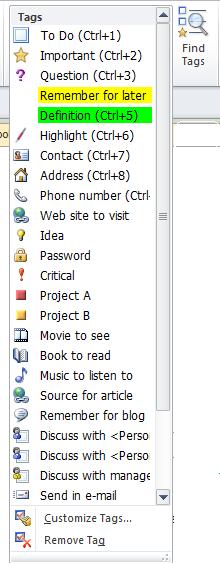
Why is this exciting? One Note has a series of Tags that you can add to any page that are easy to search by with the “Find Tags” button on the ribbon. I’m copying and pasting a screen shot of the Tags drop down to the right but there are even more than are listed. This feature makes me SQUEE!
#8 – Sync up OneNote between your phone and computer
Yes, you heard me! If you have a smart phone, it can synchronize with the OneNote on your computer. Sign me up!!
Note: You need to first set up the app on your smart phone and you must also set up OneDrive (used to be SkyDrive), which is helpful to do anyway. OneDrive is only available with OneNote 2010 and later! It will not work with the older versions.
Tips on setting up your OneDrive in OneNote and getting the iPhone app are here (along with a ton of other amazing OneNote answers).
#7 – Tables and Charts (which can be sent to Word or Outlook!)
Who doesn’t love a good table…perhaps you need one listing scene elements? You can create tables and charts directly on a OneNote page and then:
Copy and paste it to Word
Email it.
Right click on your OneNote table and choose “Copy Link to Paragraph” to embed it in a document anywhere else on your computer. (If you haven’t set up SkyDrive, the One Note file and the file where you pasted the link must be on the same computer!)
#6 – Hyperlinks to anywhere
You can copy or create hyperlinks from any page, anywhere, and put it in your notebook page. I’m thinking of keeping an active writing notebook with tabs for each topic to store the amazing links that I run across in my web surfing. My bookmarks tend to get lost because there’s so many.
#5 – Print to OneNote
When researching, you can send a whole page or part of a page directly to OneNote. Click Ctrl +P on your keyboard (or you can choose File > Print) and your page is sent to an unfiled note in OneNote, which can be moved to any section or page. Note: You’ll see your “Unfiled Notes” tab at the top of your OneNote screen.
#4 – Send whole or part of any page to OneNote with a shortcut key
Imagine surfing the web and pulling up a side note by either pressing the Windows logo button + N or clicking the N (OneNote) icon button in the task bar (down by the time) and being able to jot down your notes to keep in your book’s OneNote binder. This shortcut automatically files it in the Unfiled Tab in OneNote, which you can move around.
#3 – Audio and Video Files
OneNote will also add audio or video files to your notebook pages. It can even record the same right into a page! Now that we’re in conference season, I’ve made the goal of adding my meeting and class notes into OneNote, and then recording those extras things that I didn’t get down in my notes.
#2 – You can attach files to any page in OneNote.
Can you writers say character charts? Photos? I thought of moving this higher on the list, it’s so sublimely amazing.
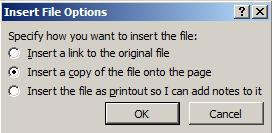
From your Windows Explorer, click and drag any file onto a OneNote Page. You will get the following dialog box:
You can insert a hyperlink, or choose the second option to have an icon on your page that you double-click on to open the file. But the last choice (to insert the file as a printout)? LOVE IT! I used this with a conference handout to make my notes next to the speakers content. It saved me a ton of time.
And my #1 FAVORITE thing in OneNote is:
OneNote doesn’t have a Save button. OneNote automatically saves your work on an almost constant basis in the background. This means I don’t lose work, even if forget to save.
p.s. If you want to save your notebook with a new name you can use the Save As feature located under the File menu. Also, if you’re using the OneDrive sync feature, you need to be sure to sync before you go on the road. OneNote auto-saves, but it doesn’t auto-sync!
For those of you who like to handwrite your notes, there is a product called Capturx for OneNote – It’s a digital pen that’s compatible with the app. AwesomeSauce!!
Does OneNote sound like it would be helpful to you? Do you have questions, or shortcuts you’d like to share? We’d love to chat with you in the comments!
Where can you get more of Jenny?
Her blog information is below, but she also teaches online. For all you writers and OneNote/Evernote fans, Microsoft just released OneNote for the Mac (it's FREE)!
Course time: webinar next Monday March 24th at 7 pm EST - it's available OnDemand afterwards, so don't worry if you can't make it.
The initial webinar is followed by two weeks of online time where we cover the material and create notebooks. We finish with another quick webinar recap.
There are various levels for the class, depending on if you just want the knowledge or if you need active one-on-one help setting up your notebooks. Be sure to click the course title link above to see what's included for the Bronze, Silver, Gold and Platinum levels.
Use the discount code MORECOWBELL for $10 off!
Lastly, we're going to have THREE special things for this kickoff class:
A member of the Microsoft OneNote team will audit the class to answer any questions on the technologies and features that are still new.
A drawing will held to give away a subscription of Office 365 to one lucky attendee.
Any interested authors will be entered into a drawing to be a guest author for the Office blog - in return for the description of how OneNote helped you "get it done," Microsoft will promote the winner's novel at the bottom of the post.
Really, y'all...how can you beat that? (You can't! This inaugural class is the only one that will have all this, since it comes so quickly on the heels of Microsoft's rollout.) Click here to sign up!
About Jenny Hansen
Jenny fills her nights with humor: writing memoir, women’s fiction, chick lit, short stories (and chasing after her toddler Baby Girl). By day, she provides training and social media marketing for an accounting firm. After 15 years as a corporate software trainer, she’s digging this sit down and write thing.
When she’s not at her blog, More Cowbell, Jenny can be found on Twitter at JennyHansenCA and at Writers In The Storm.
We're throwing open the comments at Writers In The Storm today for a little of what I like to call "Pimp and Promote."
How does this work?
Here's the rules for this Carnival of Comment Fun:
I’m taking a page out of Chuck Wendig’s book once again for you guys to do the following...
Pimp out somebody else’s work – this can be a favorite author, blogger, post or book you’ve read, a wonderful teacher or just someone who had profound influence on you as a writer or a person.
OR
Promote one of your projects that you’re excited about – a hobby, a blog, a book, a new direction your writing is taking you. You decide. Just tell us all about it in the comments! The rest of us will jump in and “ooooh and coo” at you, and likely promote your project even further (because that's just how we roll).
Better yet, do one of each! And please peruse the comments. You might find something else you like in the plethora of pimping that's about to ensue.
We hope y'all are looking forward to an amazing August!